
Best Free Keystroke Visulizer Software for Windows
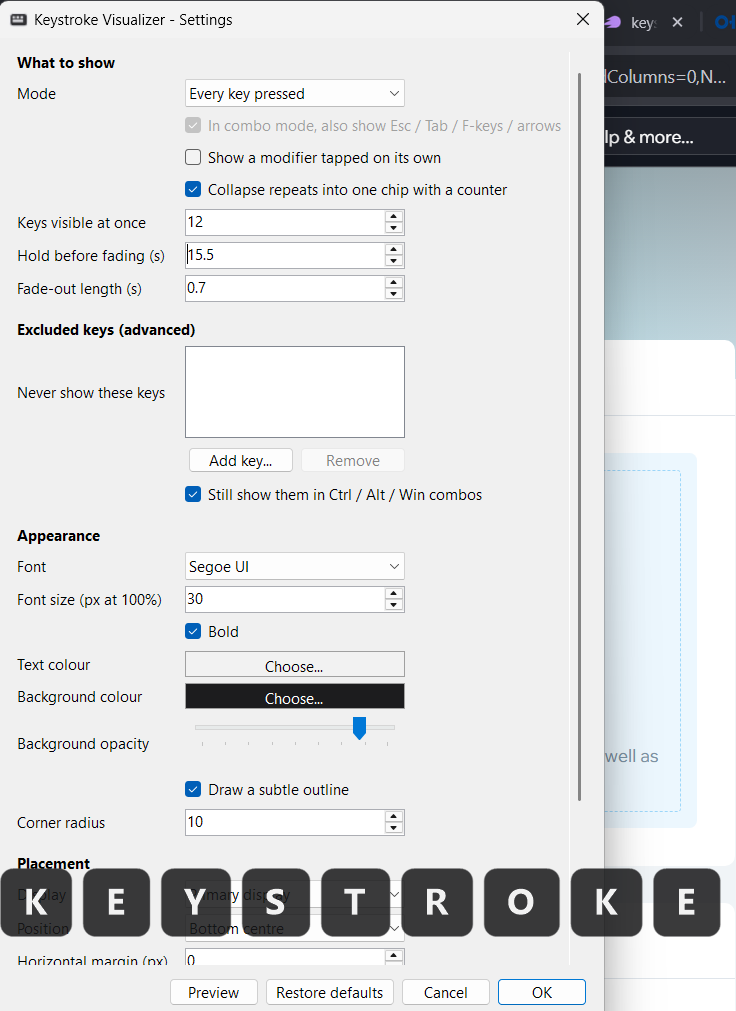
Keystroke Visualizer are a great software for productivity, typing practice, screen recording, tutorials, presentation, and many other areas. Keystroke visualizer can help you show what keys you are pressing in real time. In this article, I will share the best keystroke visualizer software for Windows.
You can download the software itself for free in this article.
What is Keystroke Visualizer Software? What it does?
A Keystroke Visualizer software shows the keys your are pressing on your keyboard in real time. You can press any key on your keyboard and it will be shown on your screen in real time. You as well as anyone seeing your screen(interview, screen recoding software, screen share apps, Google Meets, etc) will see what keys you are pressing as well. Keystroke visualizer is a small but powerful utility tool for windows.
Best Keystroke Visualizer for Windows
Keystroke Visualizer by Utility Tools is the best software in this category for Windows. The software is lightweight and can run on any windows computer with minimum RAM requirements. It has powerful settings that can help you micro manage all your visualizer settings, colors, fonts, and many other settings. And best of all, it is free. Anyone can download this free software and use it without any subscriptions, bloatware, or ads.
The software takes less then a minute to setup and get ready to use. It has advanced features such as time limit of fading, number of keys shown, key exclusion and more.
Features of Utility Tools Keyword Visualizer
The keystroke visualizer has tons of features. Here are some of the best features of this software.
- Show All Keys or Combination Keys – You can either show every key pressed on your keyboard, or only show the combination keys(Ctrl+Key, Alt+Key, etc).
- Collapse Repeat Key in one key with counter or show them multiple times
- Control total number of keys shows at once.
- Key Hold time and fade animation time.
- Key exclusion for keys you do not want to show.
- Control appearance of the visuals – Font family, color, background color, and more.
- Placement control – Place the software anywhere on your screen.
Download Software
You can download the software for Windows using the button below.